

 help
help www.easyphp.org
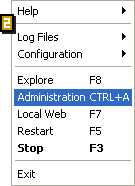
 Before opening "Administration" or "local Web", verify that easyphp.exe is running (eg: Start>Programs>EasyPHP>EasyPHP) and that the servers' status is OK (double click on the EasyPHP icon beside the clock [1]: the status of Apache and MySQL must be green).
Administration
Right-click on the EasyPHP icon [1] and select "Administration"[2]. The page displayed allows you to manage your databases and administer Aliases.
Local web
Right-click on the EasyPHP [1] icon and select "local Web"[2] to display your files (see "Introduction to EasyPHP").